# Quota and limits
> Learn how generation limits, request rate limits, and signed URL caching work.
Canonical: https://bannerify.co/docs/account/quota
Bannerify limits two things: how many files your workspace generates each month, and how many requests one API key sends in a short window. This page covers both, what counts as a generation, and what to do when a request is refused.
## Generation limits
Every plan has a monthly limit. The Free plan also has a daily limit.
| Plan | Per month | Per day |
| --- | ---: | ---: |
| Free | 100 | 10 |
| Automate | 3,000 or 10,000 | No daily limit |
| Scale | 20,000 or 40,000 | No daily limit |
| Enterprise | 100,000, 500,000, or 1,000,000 | No daily limit |
The Free limits apply to personal workspaces. A team workspace on the Free plan cannot generate files, which is why every new team workspace starts with a 14-day Automate 3k trial. [Billing](https://bannerify.co/docs/account/billing) explains the trial.
Both limits reset on UTC time. The daily limit resets at 00:00 UTC and the monthly limit on the first day of each UTC month. There are no overage charges. When you reach a limit, requests stop until the next reset or until you upgrade.
**Billing & Usage** shows how many generations you used this month.
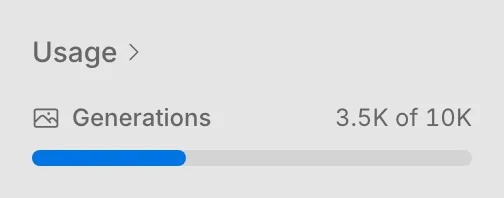
The sidebar shows the same count under **Usage**.
 ## What counts as a generation
A generation counts after Bannerify renders the file, and for a stored file, after the upload. A render or an upload that fails does not count.
| Request | Counts |
| --- | --- |
| `createImage` and `createPdf` | Yes |
| `createStoredImage` and `createStoredPdf` | Yes |
| A signed URL that renders a new image | Yes |
| A signed URL served from the cache | No |
| MCP tools `create_image`, `create_pdf`, and `create_image_from_shapes` | Yes |
| CLI `create image` and `create pdf` | Yes |
| Zapier, n8n, and Notion renders | Yes |
| A download in the [embedded editor](https://bannerify.co/docs/integrations/embed-editor), and `requestContent` of the embed SDK | Yes |
| Template list, template details, and project info | No |
| A render or an upload that fails, or a request that Bannerify refuses | No |
## When you reach a limit
The API returns the error code `USAGE_EXCEEDED`. The message names the limit you hit, for example `You have exceeded your monthly usage limit (100)`. Read `error.code` to detect it, because the HTTP status is 500, which other errors share.
You can wait for the next reset, [upgrade your plan](https://bannerify.co/docs/account/billing#change-your-plan), or email [an@bannerify.co](mailto:an@bannerify.co) if you need a higher limit on Enterprise.
The CLI, the MCP server, and the no-code integrations show the same error.
## Rate limits
Each API key can send up to 100 requests every 10 seconds. The count is per group of endpoints, so a burst on one group does not use up the allowance of another.
| Group | Endpoints that share a counter | Error code over the limit |
| --- | --- | --- |
| Images | `createImage` | `RATE_LIMITED` |
| Signed URLs | `signedurl` | `RATE_LIMITED` |
| PDFs and stored images | `createPdf` and `createStoredImage` | `TOO_MANY_REQUESTS` |
| Stored PDFs | `createStoredPdf` | `TOO_MANY_REQUESTS` |
The info, template list, and template details endpoints have no rate limit.
The counter works in fixed 10-second windows, and a new window starts at zero. Responses from `createImage`, `createPdf`, and signed URLs carry two headers:
| Header | Value |
| --- | --- |
| `RateLimit-Remaining` | Requests left in the current window |
| `RateLimit-Reset` | The time the window ends, as a Unix timestamp in milliseconds |
The error message repeats the reset time. Wait until then and send the request again. For a bulk job, cap the number of requests in flight and retry with a short delay instead of retrying in a tight loop.
To raise the limit for a key, email [an@bannerify.co](mailto:an@bannerify.co).
## Signed URL cache
Bannerify caches the image behind a signed URL for up to 7 days, and a cache hit does not count as a generation. [Signed URLs](https://bannerify.co/docs/essentials/signed-urls#caching) explains how the cache works and how to skip it.
## Stay within your quota
- Save the result once and reuse its URL. For an email or a static page, call `createStoredImage` once and keep the returned URL instead of rendering on every view.
- Reuse the same signed URL for the same data. A new URL for every page view renders every time.
- Check **Billing & Usage** before you start a large batch.
## Related
- [Previous: Billing](https://bannerify.co/docs/account/billing)
- [Documentation index](https://bannerify.co/docs/llms.txt)
## What counts as a generation
A generation counts after Bannerify renders the file, and for a stored file, after the upload. A render or an upload that fails does not count.
| Request | Counts |
| --- | --- |
| `createImage` and `createPdf` | Yes |
| `createStoredImage` and `createStoredPdf` | Yes |
| A signed URL that renders a new image | Yes |
| A signed URL served from the cache | No |
| MCP tools `create_image`, `create_pdf`, and `create_image_from_shapes` | Yes |
| CLI `create image` and `create pdf` | Yes |
| Zapier, n8n, and Notion renders | Yes |
| A download in the [embedded editor](https://bannerify.co/docs/integrations/embed-editor), and `requestContent` of the embed SDK | Yes |
| Template list, template details, and project info | No |
| A render or an upload that fails, or a request that Bannerify refuses | No |
## When you reach a limit
The API returns the error code `USAGE_EXCEEDED`. The message names the limit you hit, for example `You have exceeded your monthly usage limit (100)`. Read `error.code` to detect it, because the HTTP status is 500, which other errors share.
You can wait for the next reset, [upgrade your plan](https://bannerify.co/docs/account/billing#change-your-plan), or email [an@bannerify.co](mailto:an@bannerify.co) if you need a higher limit on Enterprise.
The CLI, the MCP server, and the no-code integrations show the same error.
## Rate limits
Each API key can send up to 100 requests every 10 seconds. The count is per group of endpoints, so a burst on one group does not use up the allowance of another.
| Group | Endpoints that share a counter | Error code over the limit |
| --- | --- | --- |
| Images | `createImage` | `RATE_LIMITED` |
| Signed URLs | `signedurl` | `RATE_LIMITED` |
| PDFs and stored images | `createPdf` and `createStoredImage` | `TOO_MANY_REQUESTS` |
| Stored PDFs | `createStoredPdf` | `TOO_MANY_REQUESTS` |
The info, template list, and template details endpoints have no rate limit.
The counter works in fixed 10-second windows, and a new window starts at zero. Responses from `createImage`, `createPdf`, and signed URLs carry two headers:
| Header | Value |
| --- | --- |
| `RateLimit-Remaining` | Requests left in the current window |
| `RateLimit-Reset` | The time the window ends, as a Unix timestamp in milliseconds |
The error message repeats the reset time. Wait until then and send the request again. For a bulk job, cap the number of requests in flight and retry with a short delay instead of retrying in a tight loop.
To raise the limit for a key, email [an@bannerify.co](mailto:an@bannerify.co).
## Signed URL cache
Bannerify caches the image behind a signed URL for up to 7 days, and a cache hit does not count as a generation. [Signed URLs](https://bannerify.co/docs/essentials/signed-urls#caching) explains how the cache works and how to skip it.
## Stay within your quota
- Save the result once and reuse its URL. For an email or a static page, call `createStoredImage` once and keep the returned URL instead of rendering on every view.
- Reuse the same signed URL for the same data. A new URL for every page view renders every time.
- Check **Billing & Usage** before you start a large batch.
## Related
- [Previous: Billing](https://bannerify.co/docs/account/billing)
- [Documentation index](https://bannerify.co/docs/llms.txt)