Account
Quota and limits
Learn how generation limits, request rate limits, and signed URL caching work.
Bannerify limits two things: how many files your workspace generates each month, and how many requests one API key sends in a short window. This page covers both, what counts as a generation, and what to do when a request is refused.
Generation limits
Every plan has a monthly limit. The Free plan also has a daily limit.
| Plan | Per month | Per day |
|---|---|---|
| Free | 100 | 10 |
| Automate | 3,000 or 10,000 | No daily limit |
| Scale | 20,000 or 40,000 | No daily limit |
| Enterprise | 100,000, 500,000, or 1,000,000 | No daily limit |
The Free limits apply to personal workspaces. A team workspace on the Free plan cannot generate files, which is why every new team workspace starts with a 14-day Automate 3k trial. Billing explains the trial.
Both limits reset on UTC time. The daily limit resets at 00:00 UTC and the monthly limit on the first day of each UTC month. There are no overage charges. When you reach a limit, requests stop until the next reset or until you upgrade.
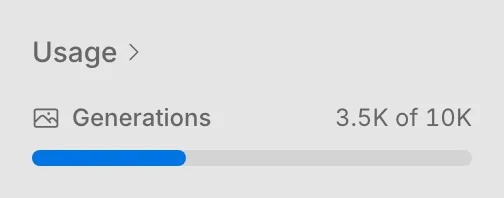
Billing & Usage shows how many generations you used this month. The sidebar shows the same count under Usage.
What counts as a generation
A generation counts after Bannerify renders the file, and for a stored file, after the upload. A render or an upload that fails does not count.
| Request | Counts |
|---|---|
createImage and createPdf |
Yes |
createStoredImage and createStoredPdf |
Yes |
| A signed URL that renders a new image | Yes |
| A signed URL served from the cache | No |
MCP tools create_image, create_pdf, and create_image_from_shapes |
Yes |
CLI create image and create pdf |
Yes |
| Zapier, n8n, and Notion renders | Yes |
A download in the embedded editor, and requestContent of the embed SDK |
Yes |
| Template list, template details, and project info | No |
| A render or an upload that fails, or a request that Bannerify refuses | No |
When you reach a limit
The API returns the error code USAGE_EXCEEDED. The message names the limit you hit, for example You have exceeded your monthly usage limit (100). Read error.code to detect it, because the HTTP status is 500, which other errors share.
You can wait for the next reset, upgrade your plan, or email an@bannerify.co if you need a higher limit on Enterprise.
The CLI, the MCP server, and the no-code integrations show the same error.
Rate limits
Each API key can send up to 100 requests every 10 seconds. The count is per group of endpoints, so a burst on one group does not use up the allowance of another.
| Group | Endpoints that share a counter | Error code over the limit |
|---|---|---|
| Images | createImage |
RATE_LIMITED |
| Signed URLs | signedurl |
RATE_LIMITED |
| PDFs and stored images | createPdf and createStoredImage |
TOO_MANY_REQUESTS |
| Stored PDFs | createStoredPdf |
TOO_MANY_REQUESTS |
The info, template list, and template details endpoints have no rate limit.
The counter works in fixed 10-second windows, and a new window starts at zero. Responses from createImage, createPdf, and signed URLs carry two headers:
| Header | Value |
|---|---|
RateLimit-Remaining |
Requests left in the current window |
RateLimit-Reset |
The time the window ends, as a Unix timestamp in milliseconds |
The error message repeats the reset time. Wait until then and send the request again. For a bulk job, cap the number of requests in flight and retry with a short delay instead of retrying in a tight loop.
To raise the limit for a key, email an@bannerify.co.
Signed URL cache
Bannerify caches the image behind a signed URL for up to 7 days, and a cache hit does not count as a generation. Signed URLs explains how the cache works and how to skip it.
Stay within your quota
- Save the result once and reuse its URL. For an email or a static page, call
createStoredImageonce and keep the returned URL instead of rendering on every view. - Reuse the same signed URL for the same data. A new URL for every page view renders every time.
- Check Billing & Usage before you start a large batch.